> ## Documentation Index
> Fetch the complete documentation index at: https://docs.calstudio.com/llms.txt
> Use this file to discover all available pages before exploring further.
# Koah Labs Ad Monetization
> Serve contextual AI ads inside your CalStudio apps through our partnership with Koah Labs.
CalStudio now partners with Koah Labs so you can turn any AI experience into an ad-supported product without writing code.
## Overview
Koah Labs helps AI creators monetize apps with relevant, privacy-conscious ad placements. When you enable Koah Ads from your CalStudio app settings, the integration automatically:
* Connects your selected app to Koah's contextual ad network
* Detects what the end-user is talking about during a session
* Serves inline ad suggestions that match the topic (e.g., workouts, finance, travel)
* Tracks clicks and earnings so you can get paid out in cash
## Requirements
Launch any app you want to monetize from your dashboard.
Accept Koah's terms when enabling ads. Their guide covers how their marketplace works.
Required to distribute ad earnings. Connect Stripe once per workspace so funds can be deposited.
Ads begin serving as soon as conversations hit qualifying contexts.
## Enable Koah Ads in CalStudio
### 1. Connect Stripe for payouts
1. Sign in to the [CalStudio Dashboard](https://calstudio.com/dashboard) and open **Workspace Settings** → **Billing & Payouts**.
2. Click **Connect Stripe** and complete Stripe's onboarding flow.
3. Once Stripe shows as **Connected**, CalStudio can route Koah Labs ad payouts to your bank account.
You only need to connect Stripe once per workspace. All apps that monetize with Koah Ads will use the same payout destination.
### 2. Enable Koah Ads on an app
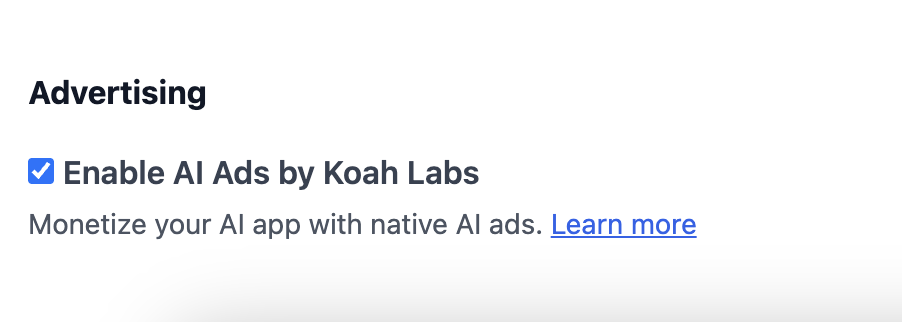
1. Open the app you want to monetize and click **App Settings** → **Monetization**.
2. Toggle **Koah Ads** to **On** and accept the Koah Labs terms of service.
3. Ads automatically render at the end of chat responses, so no manual placement selection is required.
4. Save your changes. Ads will begin serving immediately without additional deployment steps.
 ### 3. Preview the experience
1. Launch your app in preview mode.
2. Start a conversation on a specific topic (e.g., “create a weight lifting routine”).
3. When Koah detects the context, it returns an ad panel that matches the conversation, such as a training program or supplement offer.
### 3. Preview the experience
1. Launch your app in preview mode.
2. Start a conversation on a specific topic (e.g., “create a weight lifting routine”).
3. When Koah detects the context, it returns an ad panel that matches the conversation, such as a training program or supplement offer.
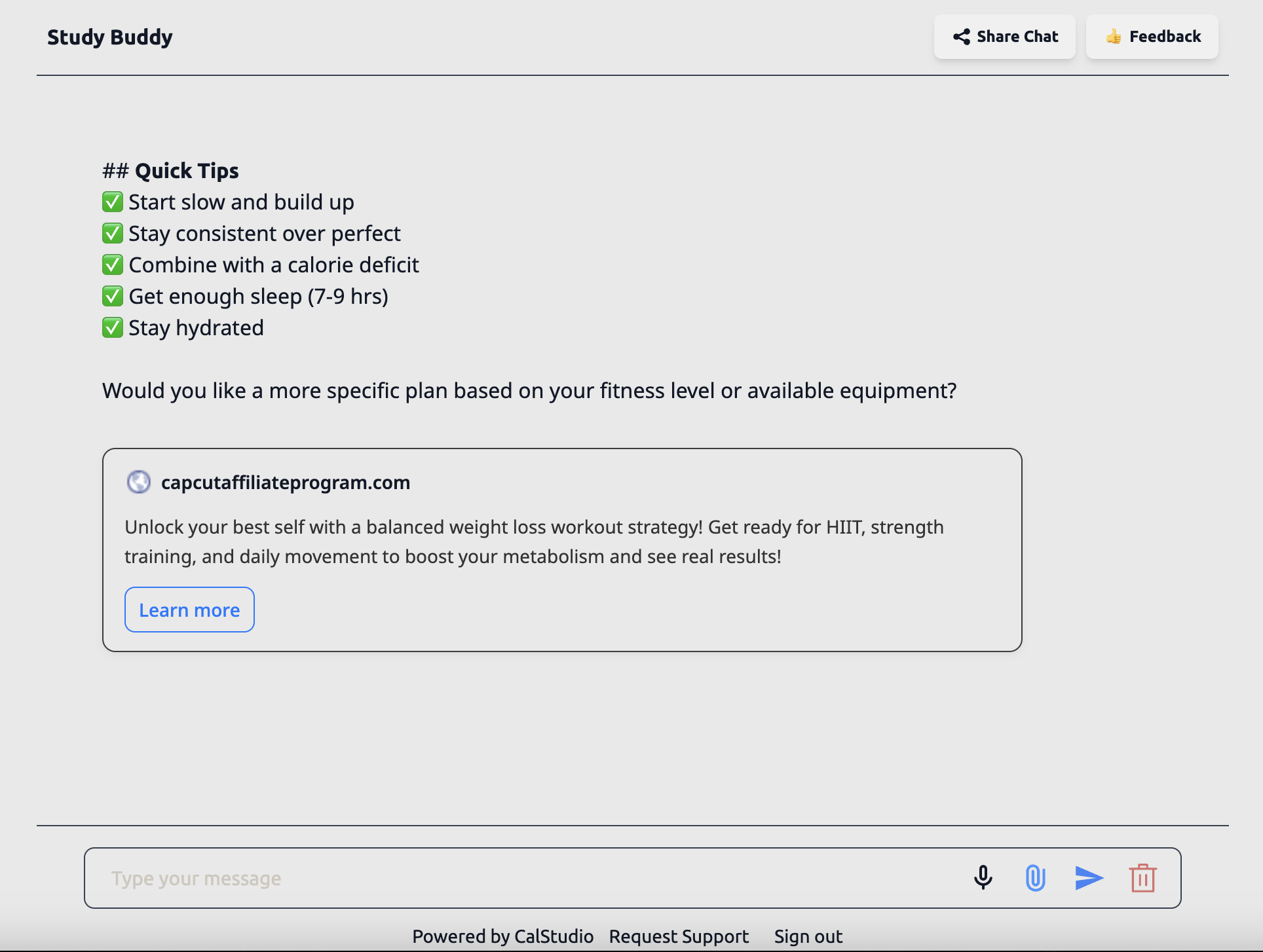 If you switch topics during a session, Koah automatically refreshes the ad creative so it remains relevant.
## How contextual ads are selected
Koah Labs analyzes the live conversation transcript (not stored by CalStudio) to understand the subject matter. Only context that is necessary to choose the correct ad is sent, and Koah returns a structured payload with:
* Creative copy, image, and CTA metadata
* Relevance tags (fitness, finance, travel, etc.)
* Tracking identifiers for impressions and clicks
CalStudio renders that payload in your chat UI without additional wiring. You maintain full control over the design via your existing theme settings.
## Tracking clicks and earnings
* **In-app analytics**: A dedicated Koah Ads dashboard inside **Analytics → Monetization** is in progress and targeted for **Q1 2026**.
* **Monthly statements**: Until the dashboard ships, we will email you at the end of each month with a CSV that lists impressions, clicks, effective CPM/CPC, and the Stripe payout amount.
* **Stripe transfers**: Expect deposits to land within 2–3 business days after each monthly statement. You will also see the transfer memo `CALSTUDIO · KOAH ADS`.
If Stripe is disconnected or unverified, Koah Ads will pause automatically and we will notify the workspace owner so you can get back online before the next payout cycle.
## Resources
* [Koah Labs Monetization Guide](https://www.koahlabs.com/guides/monetization-for-ai-app-creators)
* [CalStudio Monetization Support](mailto:support@calstudio.com)
This documentation is built and hosted on [Mintlify](https://mintlify.com), a developer documentation platform.
If you switch topics during a session, Koah automatically refreshes the ad creative so it remains relevant.
## How contextual ads are selected
Koah Labs analyzes the live conversation transcript (not stored by CalStudio) to understand the subject matter. Only context that is necessary to choose the correct ad is sent, and Koah returns a structured payload with:
* Creative copy, image, and CTA metadata
* Relevance tags (fitness, finance, travel, etc.)
* Tracking identifiers for impressions and clicks
CalStudio renders that payload in your chat UI without additional wiring. You maintain full control over the design via your existing theme settings.
## Tracking clicks and earnings
* **In-app analytics**: A dedicated Koah Ads dashboard inside **Analytics → Monetization** is in progress and targeted for **Q1 2026**.
* **Monthly statements**: Until the dashboard ships, we will email you at the end of each month with a CSV that lists impressions, clicks, effective CPM/CPC, and the Stripe payout amount.
* **Stripe transfers**: Expect deposits to land within 2–3 business days after each monthly statement. You will also see the transfer memo `CALSTUDIO · KOAH ADS`.
If Stripe is disconnected or unverified, Koah Ads will pause automatically and we will notify the workspace owner so you can get back online before the next payout cycle.
## Resources
* [Koah Labs Monetization Guide](https://www.koahlabs.com/guides/monetization-for-ai-app-creators)
* [CalStudio Monetization Support](mailto:support@calstudio.com)
This documentation is built and hosted on [Mintlify](https://mintlify.com), a developer documentation platform.